
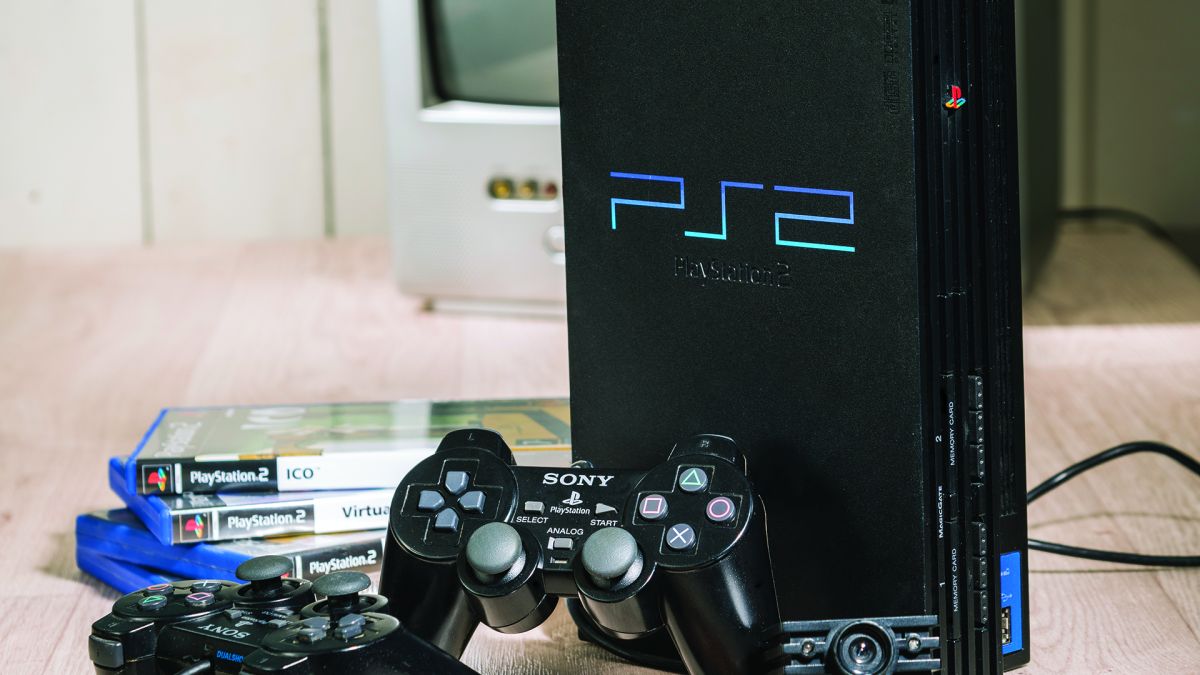
TL;DR — which PS2 should you pick?
- If you want the hard drive option and expansion accessories, the fat PS2 wins (expansion bay + Network Adaptor use-case).
- If you want a smaller form factor that’s usually quieter and easier to place, the slim ps2 is the easy choice.
- For reliability, both can be great — most failures we see are laser lens / disc-read wear, power issues, or heat-related behavior, not “performance.”
- Best next step if yours is skipping, freezing, or “not reading”: do the safe checks below — if symptoms persist, use our game console repair service.
PlayStation 2 Fat vs Slimline: what actually changed?
Sony made multiple revisions across the years — different boards, power layouts, and disc mechanisms. The big “fat vs slimline” split is real, but the useful differences aren’t what most people argue about online. On a workbench, we care about: storage options, heat behavior, disc handling, and how each model is wired internally.
You’ll see model families referenced a lot: SCPH-30000 (a common early fat line), later fat revisions like SCPH-500xx, and slim families that end up around SCPH-9000x. These “models introduced” over time can matter for little quirks (like accessory fit, disc behavior, and certain regions).
PS2 Fat vs Slim: 4 main differences you didn’t know
| Difference | PS2 Fat (Original) | PS2 Slim / Slimline | What it means in real life |
|---|---|---|---|
| 1) Power & footprint | Internal power supply (no external brick) | Usually an external power brick (some later units changed power layout) | If your setup is tight, the slim is easier to place; if you hate extra cables, fat feels cleaner. (Either can fail — power symptoms just show differently.) |
| 2) Storage & expansion | Expansion bay + hard drive bay support via add-ons | No internal HDD space — the drive bay is gone | If you want an internal hard option for specific setups, fat is the practical choice. Slim can still be great — it’s just different. |
| 3) Connectivity | Networking depends on accessories (adaptor / add-on) | Usually includes a built-in ethernet port (varies by market) | For LAN titles and simple network play, slim is convenient. For accessory-driven setups, fat has more flexibility. |
| 4) Disc mechanism & heat | Tray-loading optical drive assembly | Top-loading lid design; ribbon/cable wear is a known issue | Both can develop disc-read problems — fat often from age/laser wear, slim often from lid or cable alignment. Heat behavior depends on airflow and environment. |
Now let’s break those four differences down like a technician would — what fails, what’s normal, and what’s worth caring about.
1) Size, noise, and power: why slim often feels “better” day-to-day
The PS2 slimline was built to be easier to fit in modern TV stands, and many owners describe it as quieter in typical use. That said: “quiet” doesn’t automatically mean “healthier.” A dusty room, blocked vents, or running it in a closed cabinet can still create overheating issues over time — on either model.
The practical difference is cable and power layout. Many slim units rely on external power (that’s where the power brick comes in), while the fat usually keeps power inside the shell. If your PS2 randomly powers off, flickers, or only works after “warming up,” power delivery is one of the first things we sanity-check — without opening the console.
2) Expansion bay & hard drive: the real reason collectors still chase the fat
The fat PS2 design supports the rear expansion bay and classic add-ons like the network adapter, which historically enabled an internal hard setup (using the rear bay + accessory interface). The slim removed that physical space — so if you’re buying purely for that capability, slim won’t match it.
If you don’t care about that, slim is often the smoother “just play” option. But if you’re comparing “ps2 fat or ps2 slim for a specific accessory workflow,” the bay design is the deciding factor.
Also: don’t confuse storage with performance. Most PS2s aren’t “faster” in any meaningful way for normal play — the big win is convenience and how your setup is built.
3) Ports & connectivity: what matters, what doesn’t
Both models keep the basics people use daily: USB, video out, and the front memory card slots. But the “how” changes by revision — and that matters when you’re shopping used or diagnosing odd behavior.
Controller & memory basics
For normal couch play, you just want stable controller ports (front connections) and clean card reads. If inputs are laggy or intermittent, we look for simple causes first: worn connectors, debris, or a questionable third-party accessory chain.
Networking differences (fat accessory vs slim convenience)
With fat, networking commonly depended on add-ons (and yes, terminology varies — adaptor/adapter in different docs). With slim, networking is often simpler because it’s integrated. If you’re buying for LAN titles, this is a real “quality of life” difference.
The i.LINK story (only if you care about niche setups)
Some earlier models had an i.link port (IEEE 1394 / FireWire) in specific revisions — especially discussed in the context of releases outside of japan vs other regions. Most owners never touch it. If you do: confirm exact model and supported game list before spending money on cables or hubs.
4) Disc drive design: tray vs lid (and what we actually see failing)
The PS2 is a DVD-based console (yes, it functioned as a built-in dvd player in the living room era), and that means the optical drive is a wear item. Whether it’s fat or slim, the laser assembly ages — the question is how symptoms show up.
Typical fat symptoms
- “Reads CDs but not DVDs” or the reverse (laser aging / calibration drift)
- Clicks, hunting noises, or inconsistent reliable disc reading
- Heat-soak behavior (works cold, fails warm)
Typical slim symptoms
- Intermittent reads tied to lid pressure/alignment
- Scratching risk when internal ribbon/cable alignment is off
- More sensitivity to movement while spinning
Reliability comparison: fat vs slim PS2 models
If you’re asking “fat or slim?” because you want the most reliable unit: the answer is “it depends on the revision and how it was treated.” We’ve seen pristine fat units and abused slim units — and the opposite. But there are patterns.
How reliable are original fat PS2 models?
A well-kept fat PS2 can be extremely durable. The weak points are usually heat management and disc-drive wear. If your unit lives in a cabinet with poor airflow, heat builds up and stresses components over time — that’s where long-session stability drops.
How reliable are slim PS2 models?
Slim units do well when they’re stationary and the lid mechanism is healthy. Where we see issues is mechanical: lid switches, the disc path, and alignment problems that show up as skipping or scratches. Later revisions can behave differently.
Quick technician pick (if you’re shopping used)
- Want expansion flexibility and certain setups are easier to mod on specific fat revisions? Consider fat (and verify revision).
- Want simple placement and typical living-room use? Slim is usually the easiest daily driver.
- Either way: test with multiple known-good discs, confirm stable video output, and listen for consistent spin-up.
Compatibility: PS1 games, accessories, and the “gotchas” people miss
Yes — PS2s play ps1 games, but there can be compatibility issues depending on revision and how you’re outputting video. If you’re buying for a specific legacy library, test your top titles early.
Accessory note: multitaps and some accessories differ between fat and slim. If you’re using older gear, confirm fit and model. And if you’re chaining a bunch of adapters, avoid cheap 3rd party signal converters — they’re a common source of “no video” complaints.
Safe checks only (no opening the console)
This is the shop-floor checklist we tell owners to do at home — because it’s safe and it prevents wasted time. If any step requires opening the shell or tools beyond basic cleaning, stop.
Disc read issues (freezing, “disc read error,” or endless loading)
- Test two known-good discs (one CD-based, one DVD-based if you have them).
- Inspect the disc underside under a bright light; clean with a microfiber cloth (straight lines, not circles).
- Place the console on a stable surface; avoid moving it while spinning.
- Make sure the unit has airflow (don’t run it on carpet or inside a closed cabinet).
No video / “no signal”
- Swap to a different cable (component/composite) if available; many “no video” calls are cable failures.
- Try a different TV input and confirm the TV is on the right input source.
- If you use an upscaler/converter, test without it (those are frequent failure points).
Overheating and shutdown behavior
- Give the console open-air space on all sides; don’t stack it on other warm devices.
- Dust the exterior vents gently; do not spray liquids or force tools inside.
- If the symptom repeats quickly after cool-down, stop running it and bring it in.
Controller / memory problems
- Test another controller and another memory card (fault isolation matters).
- If one port works and the other doesn’t, don’t jam plugs — bring it in for inspection.
When to stop DIY (and why)
If you hit any of these, it’s time for a bench diagnosis:
- Persistent disc-read errors after testing multiple known-good discs (likely laser/drive control, not settings).
- Scratching noises, visible disc scraping, or repeated scratches.
- Power cycling, sudden shutdowns, burning smell, or “works only sometimes.”
- Signs of prior modding attempts or unknown wiring.
Time expectations at a real repair shop
For PS2 issues, we typically follow a predictable flow: symptom confirmation → controlled test discs → video/audio verification → thermal stability check → power integrity check. If it’s a straightforward disc-read or port-related repair, it’s often handled same-day depending on parts and workload. If it needs deeper part sourcing, expect “within a few days” rather than a quick counter fix.
(If you also own a ps3 or newer consoles: the diagnostic logic is similar, but the internal architecture and common failures differ — we handle those too via PS3 repair and PS4 repair.)
Need help choosing (or fixing) your PS2? We’ll tell you the truth fast.
Whether you’re deciding “fat or slim” before you buy, or your console is skipping/overheating/not reading reliably, we can diagnose it cleanly and explain your options in plain English.
Next step (service)
Start with our console service hub and we’ll route you to the right team and store: Game Console Repair.
Quick video overview (safe, non-repair)
If you want a fast visual comparison before you buy, this overview walks through the major fat vs slim differences without pushing risky DIY.
Useful external reference (for the networking/storage detail)
If you want the technical background on how the PS2 Network Adaptor differs from slim’s integrated Ethernet behavior, this is a solid reference: PS2 Network Adaptor (PSDevWiki).
Find a store (Florida)
We don’t spam cities in the middle of the guide. If you want hands-on help, use the store finder below.